Forge
At the Forge, you can Enhance/Enchant your character's equipment to increase their stats further.
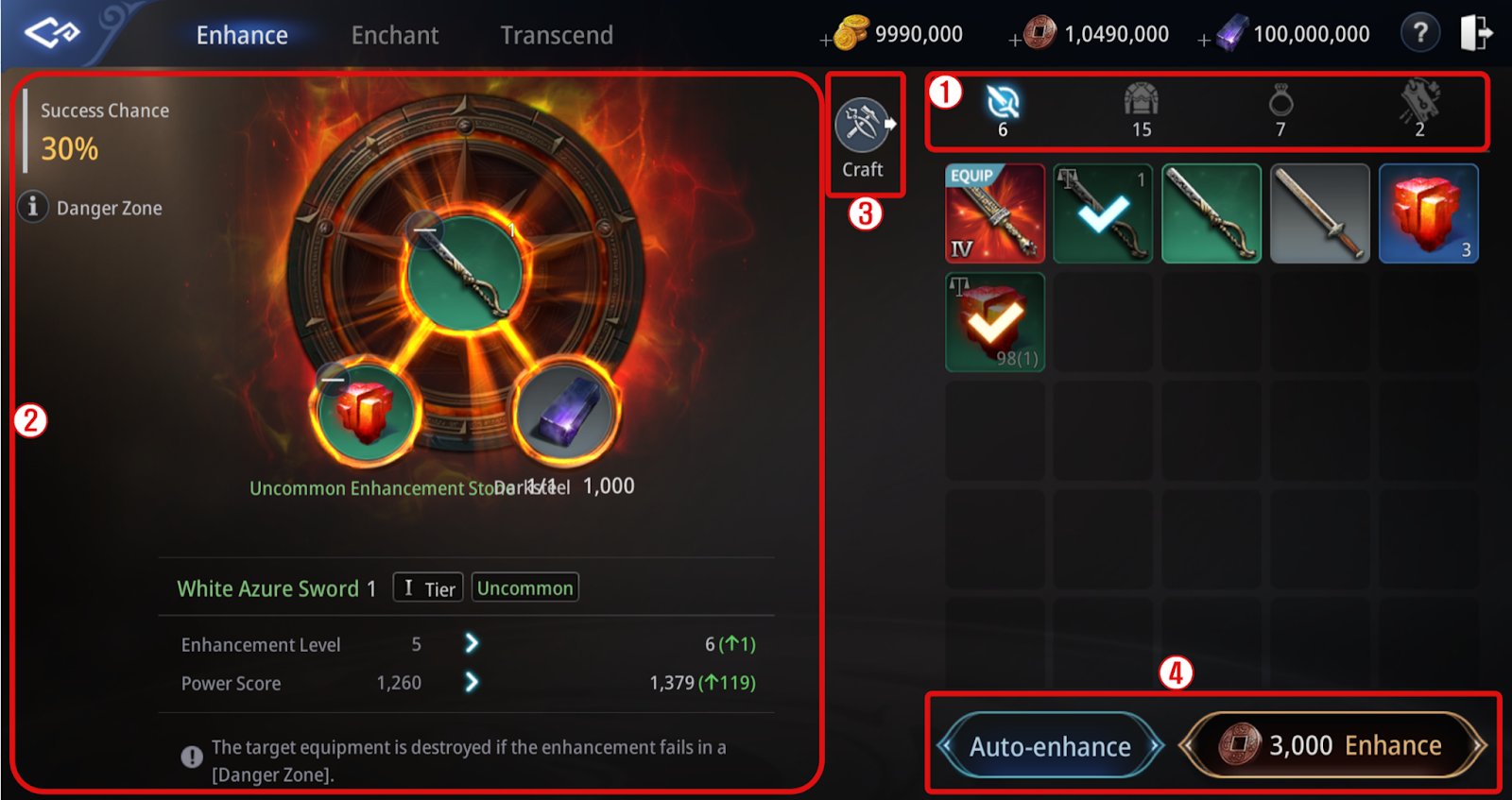
Enhance - Tap Forge > Enhance tab in the Menu. ① You can select weapons, armor, or accessories to enhance. ② To enhance an equipment, you need an Enhancement Stone of the same grade as the equipment. There are Safe Intervals and Danger Zones in enhancing, and equipment is destroyed upon failure in a Danger Zone. ③ Tapping the Craft button opens Craft > Crafting window. ④ Auto-enhance enables enhancing an Uncommon item to a selected enhancement level in one go. * Up to 12 items of the same grade can be registered by clicking the 'Multi-Register' upon Auto-Enhance, and you cannot use the feature for items in the following specifics: (Dragon Artifact, Max Enhancement Stage, Locked Status)
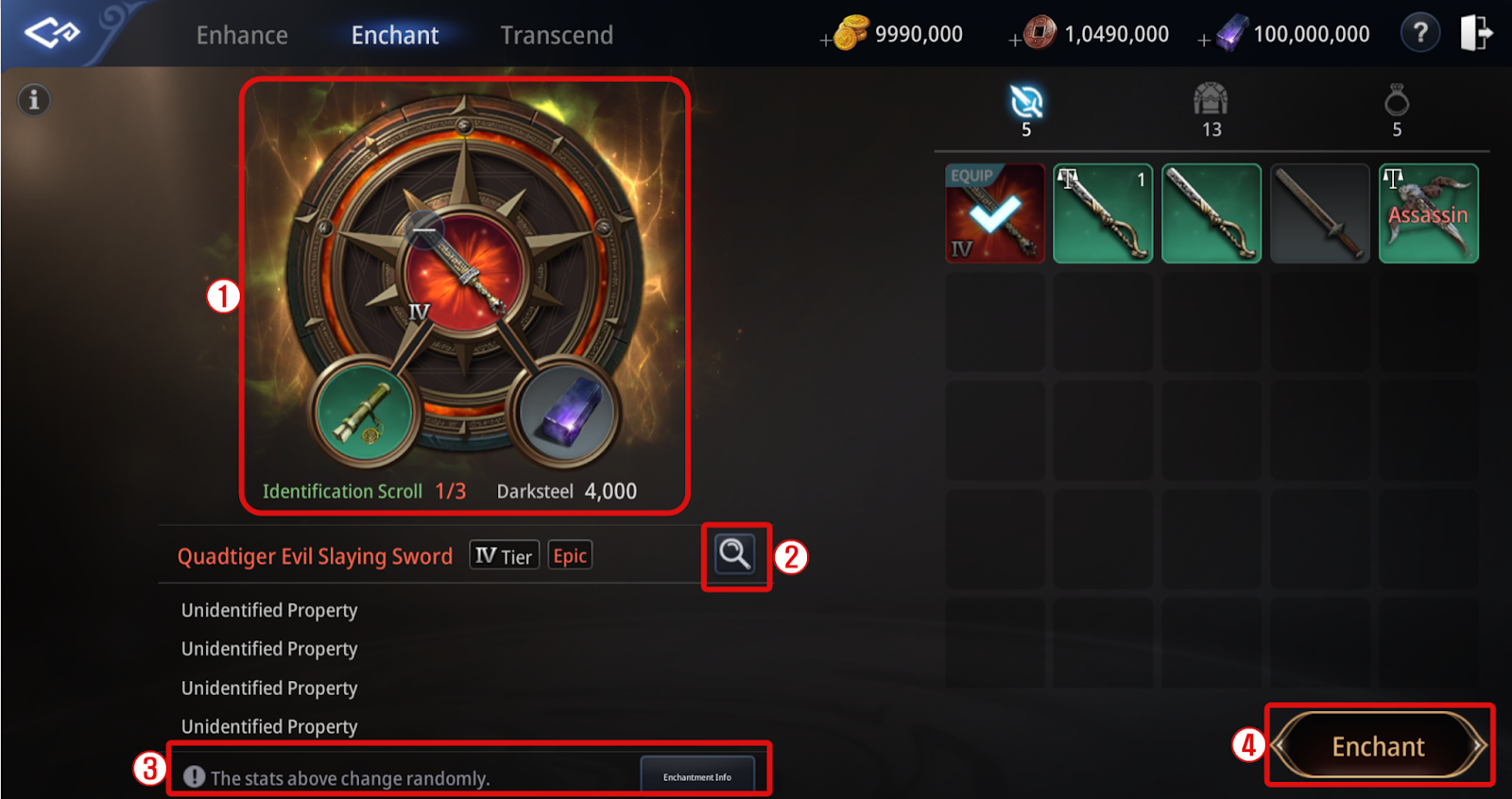
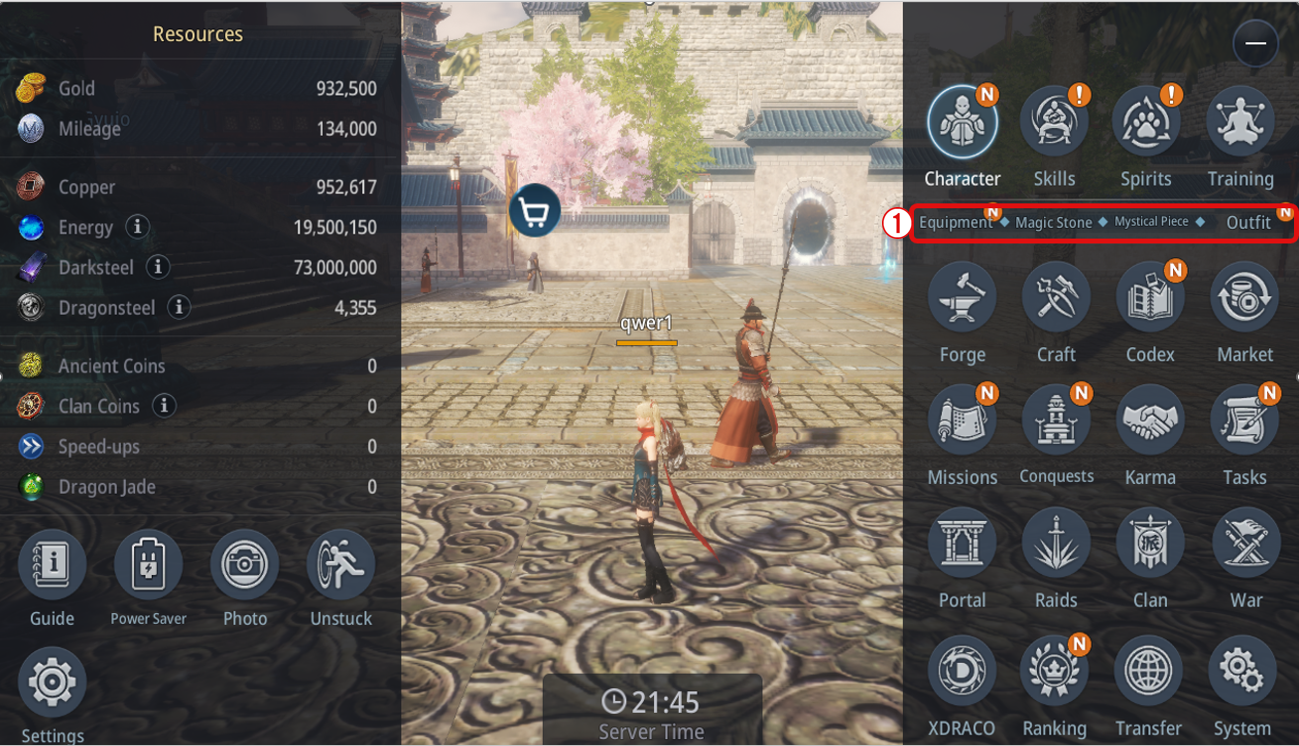
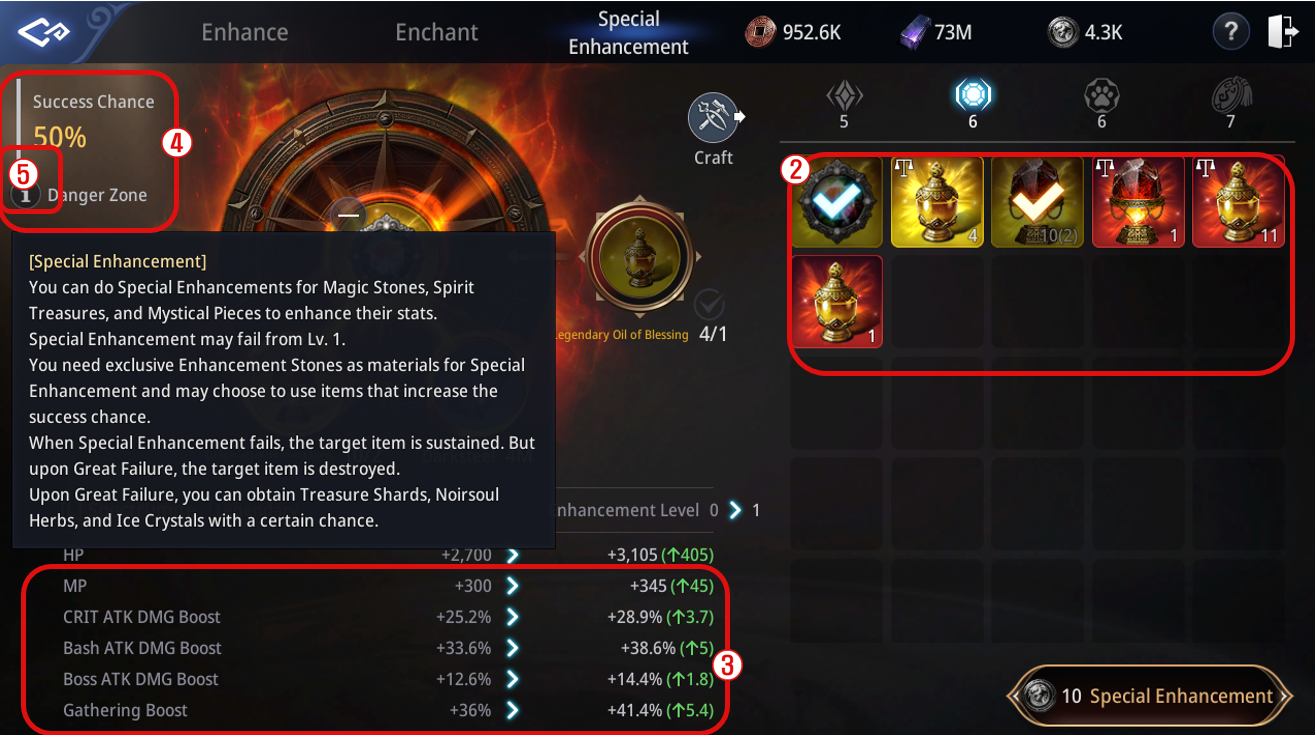
Enchant - Tap Forge > Enchant tab in the Menu. ① You can use Enchant Scrolls to enchant the options of weapons, armor, or accessories. ② Tap the magnifying glass icon to view the stats of an enchanted item. ③ Tap the Enchantment Info button to enchant an item and check the stats that can be gained. ④ Tap the Enchant button to enchant options. - Enchant will be separated into Normal and Special Enchant. - Upon Special Enchant, you can obtain 1 additional Enchant property, and the obtainable Max grade will be superior compared to Normal Enchant. ※ Regarding Cost in Special Enchant, Dragonsteel will be consumed instead of Copper. ※ Items with unidentified options will not be registerable to Market. Special Enhancement A special enhancement system that allows you to increase the stats of Epic-grade or higher Magic Stones, Spectrumites, Spirit Treasures, and Mystical Pieces. Special Enhancement consumes various enhancement materials and can be strengthened up to Stage 7. [Special Enhancement Notes] 1. Special Enhancement uses grade-appropriate ‘Special Enhancement Stones’, Darksteel, and Dragonsteel. - You can also use the grade-appropriate ‘Oil of Blessing’ to increase the enhancement success rate by 10%. 2. On Enhancement Great Failure, the item will be destroyed. - If destroyed, you may acquire items such as Treasure Shard, Spacetime Powder, Noirsoul Herb, or Ice Crystal at a set probability. 3. Only Epic-grade or higher Magic Stones, Spectrumites, Spirit Treasures, and Mystical Pieces can undergo Special Enhancement. - Magic Stones, Spectrumites, Spirit Treasures: Epic, Legendary, Mythic grades - Mystical Piece: Epic, Legendary grades [Special Enhancement Process] ① You can check your owned Magic Stones, Spectrumites, Spirit Treasures, and Mystical Piece items through the following paths. - Magic Stones, Spectrumites: Menu > Character > Magic Stone - Spirit Treasures: Menu > Spirit - Mystical Piece: Menu > Character > Mystical Piece ※ You can also access the Special Enhancement function via Menu > Forge > Special Enhancement. ② The list of items eligible for Special Enhancement can be viewed on the right side of the tab. ③ After registering the target item, you can preview the stat increases gained upon success on the bottom left. ④ Check the success rate and ‘Danger Zone’ information. ⑤ Click the ‘i’ icon next to the ‘Danger Zone’ to review important notes for Special Enhancement.
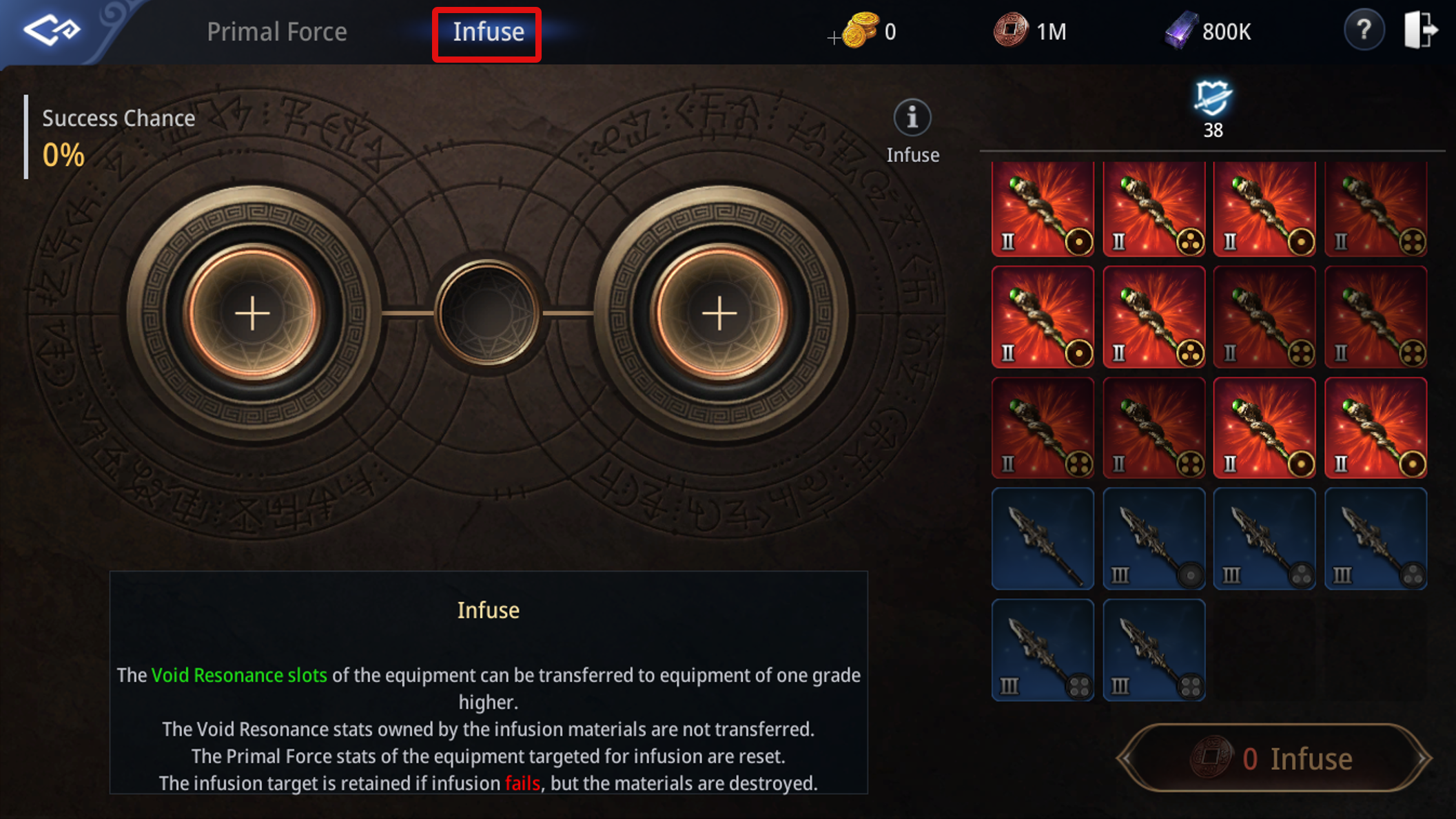
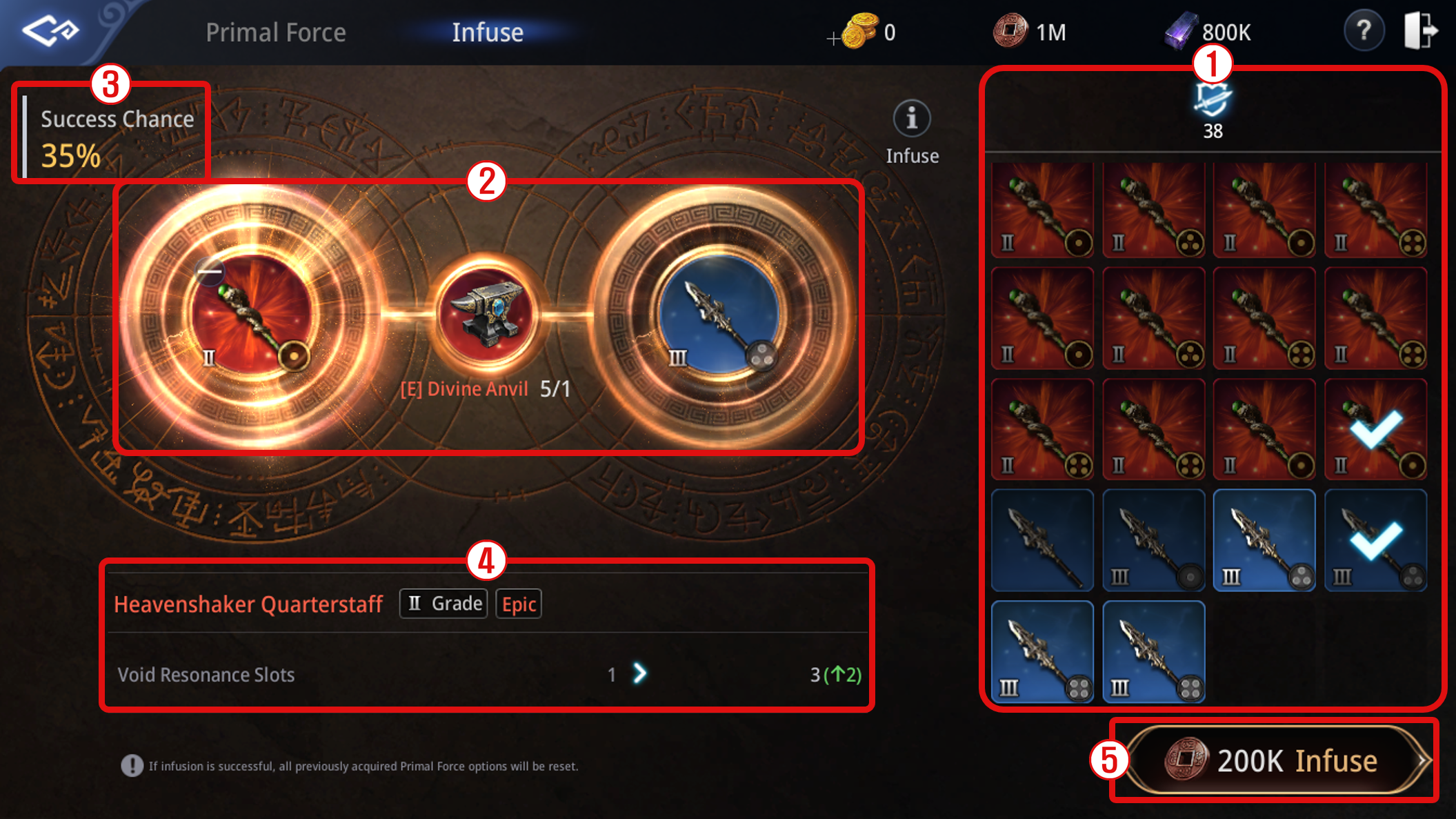
Dragon Forge - Dragon Forge is an exclusive reinforcement for the growth of Legendary IV Tier items. - You can move to Dragon Forge windows from Menu > Forge > Dragon Forge or the Dragon Forge tab located on the left of the information window for Legendary IV Tier equipment ① Register the targeted equipment for Dragon Forge at the right of your in-game window. - Dragon Forge is only available for Mythic grade or Tier 4 Legendary grade equipment (Weapon/Secondary Weapon/Armor/Accessory). ② Required materials and additional stats upon Dragon Forge Success can be viewed. - Legendary Dragon Material, Dragon Sphere, White Dragon Essence, and that of Black Dragon will be consumed per try. - There are seven stages in total, and the required number of materials increases with each stage. - Success Chance for Dragon Forge varies per stage, and the targeted equipment will not be destroyed upon resulting in Failure. Legendary Dragon Material and Sphere x1 Legendary White and Black Dragon Essence x5 10,000,000 Darksteel 200 Dragonsteel Legendary White and Black Dragon Essence x10 10,000,000 Darksteel 200 Dragonsteel Legendary Dragon Material and Sphere x1 Legendary White and Black Dragon Essence x20 10,000,000 Darksteel 200 Dragonsteel Legendary Dragon Material and Sphere x1 Legendary White and Black Dragon Essence x35 10,000,000 Darksteel 200 Dragonsteel Legendary Dragon Material and Sphere x1 Legendary White and Black Dragon Essence x55 10,000,000 Darksteel 200 Dragonsteel Legendary Dragon Material and Sphere x1 Legendary White and Black Dragon Essence x75 10,000,000 Darksteel 200 Dragonsteel Legendary Dragon Material and Sphere x1 Legendary White and Black Dragon Essence x100 10,000,000 Darksteel 200 Dragonsteel ※ Required Legendary Dragon Material for Dragon Forge varies based on the type of equipment to be forged. 1. Weapon → Legendary Dragon Scale 2. Secondary Weapon, Charm → Legendary Dragon Claw 3. Top, Bottoms, Gloves, Boots → Legendary Dragon Leather 4. Belt → Legendary Dragon Heart 5. Necklace, Bracelet, Ring → Legendary Dragon Horn 6. Earrings, Medallion, Seal → Legendary Dragon Eye - Success in Dragon Forge will increase the fundamental status of registered equipment and advance the equipment to a higher stage. ③ Dragon Forge Success Chance for your targeted equipment will be viewable. - Press (i) to check further details about Dragon Forge. ④ You can view the number of required currencies for Dragon Forge and initiate the Dragon Forge by clicking the button [Dragon Forge]. Primal Force - Primal Force unlocks when your character reaches Level 120. This system allows you to enhance equipment with additional stats, enabling even greater character growth. - You can access Primal Force through Forge > Primal Force, or by selecting the Primal Force tab in the equipment details window of Epic/Legendary/Mythic items that contain Resonance. ① You can register the equipment to perform Primal Force on the right side of the screen. - Primal Force can be performed on Epic grade or higher equipment that has Resonance applied. - When acquiring Rare-grade or higher equipment through crafting, drops, random boxes, Awakening, etc., there is a chance to obtain equipment with Resonance. ※ When crafting Mythic equipment through Awakening, Void Resonance Slots and Primal Force options from the original Legendary item will NOT transfer. - Each equipment can have up to 4 Void Resonance Slots, and equipment with more slots can receive more powerful enhancements through Primal Force. - Equipment with Resonance appears across a total of 14 equipment slots (Weapon/Secondary Weapon/5 Armor slots/7 Accessory slots). ② You can check the registered equipment and materials used for Primal Force. - Primal Force uses Epic-grade or higher Magic Stones, Dragon Steel, and Darksteel. ③ You can select the Magic Stone to register as Primal Force material on the right side of the screen. - The type of Magic Stone required varies by equipment slot. Using higher-grade or higher-tier Magic Stones grants higher stat values. - Higher-grade Magic Stones consume more resources. ④ You can select the Void Resonance Slot that will receive the stats granted through Primal Force. ⑤ You can check the stats granted to the selected Void Resonance Slot in step ④. ⑥ Clicking the [Primal Force] button will take you to the Primal Force progress screen. ⑦ You can check the progress status of Primal Force. - The stats granted through Primal Force are predefined per equipment slot and can be checked through [Primal Force Info] or the equipment’s Primal Force option (🔍︎). - Stats obtained through Primal Force consist of Main Stats and Sub Stats, with Sub Stats appearing at a 15% chance per attempt. ⑧ Through the buttons at the bottom-right of the screen, you can perform Primal Force or apply the options. - [Primal Force] consumes the materials and performs the enhancement. - If you do NOT tap [Apply], the new stats will NOT be saved. Infuse - Infuse unlocks when your character reaches Level 120 and allows transferring Void Resonance Slots from one piece of equipment to another of a higher grade. - Characters below Level 120 may use Rare–Legendary equipment (with 4 Void Resonance Slots) as Infuse materials. - Access via Forge > Primal Force > Infuse. ① You can register the equipment that will receive Resonance and the equipment that will provide Resonance on the right side of the screen. The equipment types are Weapon / Armor / Accessory / Secondary Weapon, and Infusion is only possible when the types of the receiving and providing equipment are the same. ② You can check the equipment registered for Infuse. - Infuse uses the equipment to be infused, the material equipment, Divine Anvil, and Copper. ③ You can check the success rate of Infuse. - The higher the tier of the providing equipment (right side), the higher the success rate becomes. 1 Legendary Divine Anvil 1,000,000 Copper 1 Mythic Divine Anvil 5,000,000 Copper ④ You can check the change in the number of Void Resonance Slots for the equipment through Infuse. ⑤ Clicking the [Infuse] button will immediately proceed with Infuse. - When performing Infuse, regardless of success or failure, all materials except for the equipment that was intended to receive the Void Resonance Slots will disappear. Acquisition Path for the "Divine Anvil" Infuse Material - The Divine Anvil used in Infuse can be obtained through NPC crafting/exchange, defeating monsters in Redmoon Purgatory, Raid, and Boss Raid. - In each major region's city, you can craft Divine Anvils through the <Craftsman> NPC. - When crafting, there is a 5% chance for a Great Success, and if a Great Success occurs, you can obtain a tradeable Divine Anvil. - Through the Bicheon Castle NPC <Path of Fiery Battle CDR> Park Hee, you can exchange “Trainee's Crescent Jade” for “Divine Anvil”. Bicheon Castle NPC <Path of Fiery Battle CDR> Park Hee ※ Notes for Dragon Forge and Special Exchange on Items with Primal Force and Infuse Applied 1) Dragon Forge: The number of Void Resonance Slots and Primal Force stats are retained. 2) Special Exchange: The number of Void Resonance Slots and Primal Force stats are transferred.
Document update date : 2026-09-28
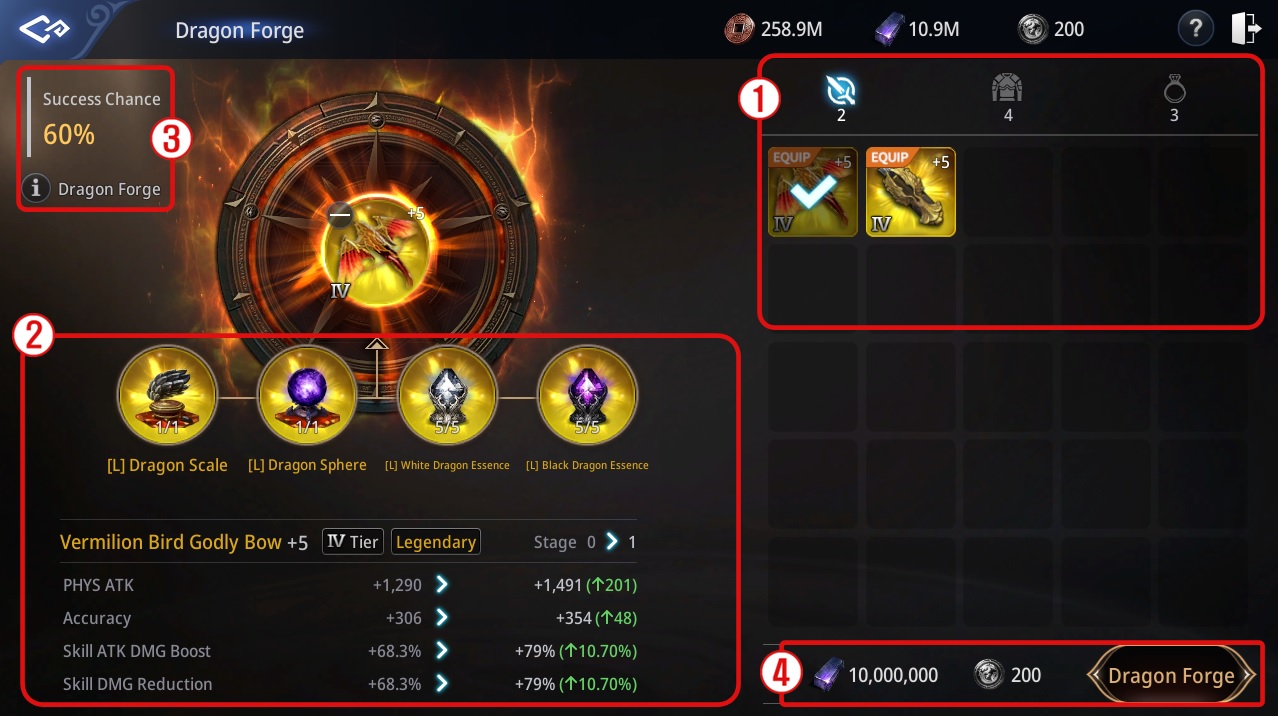
Dragon Forge Stage Success Chance Materials and Cost 1 60% 2 45% Legendary Dragon Material and Sphere x1 3 30% 4 15% 5 10% 6 5% 7 5% 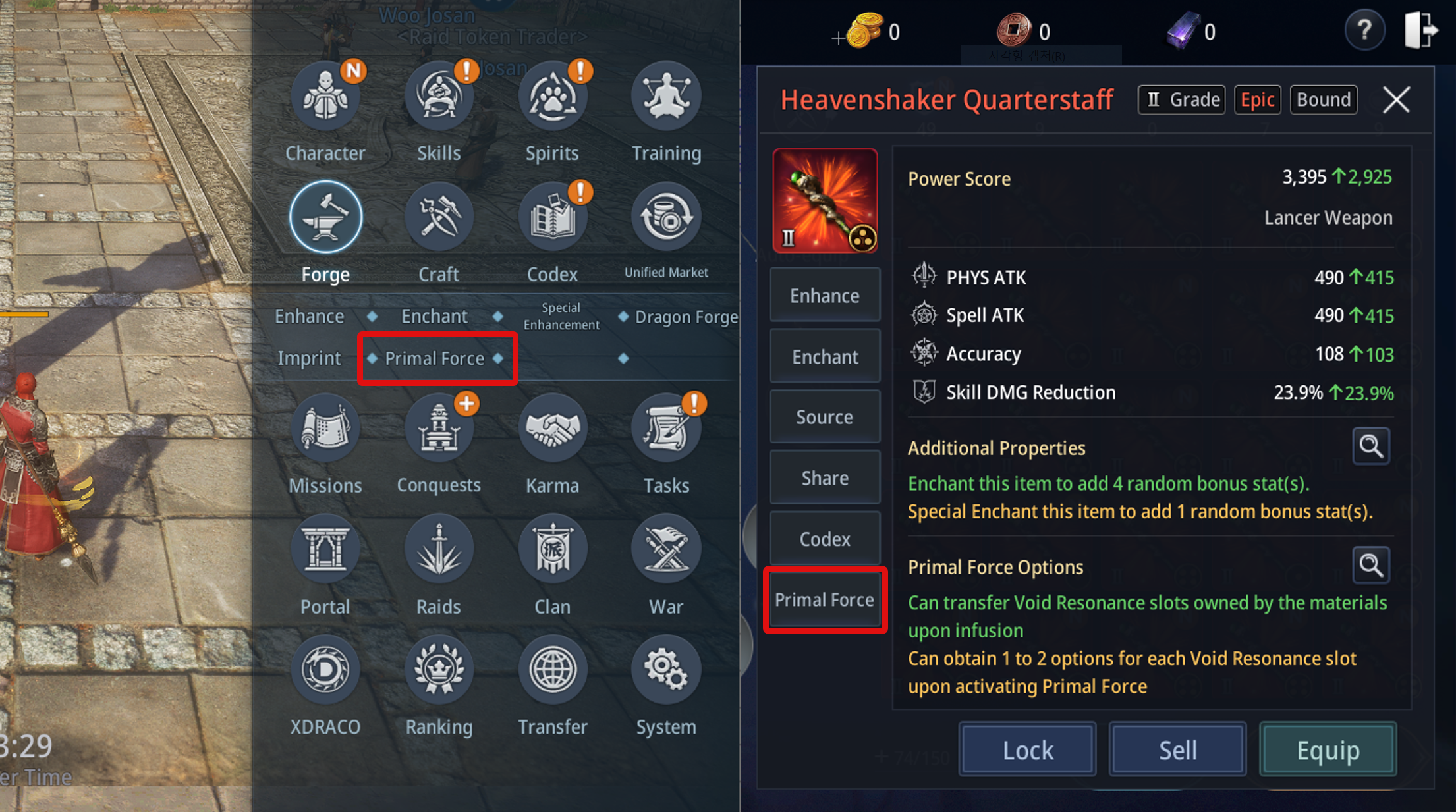
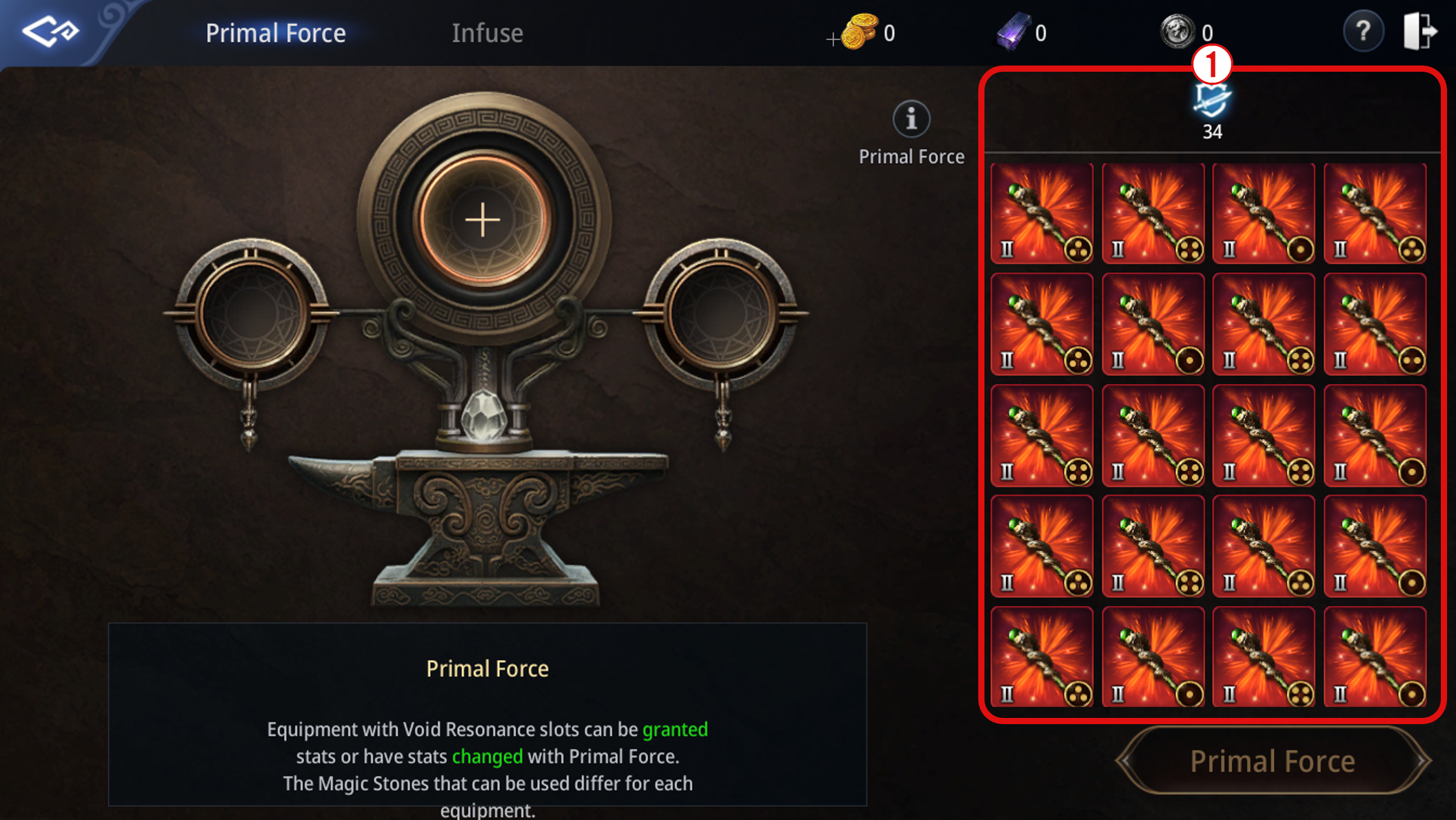
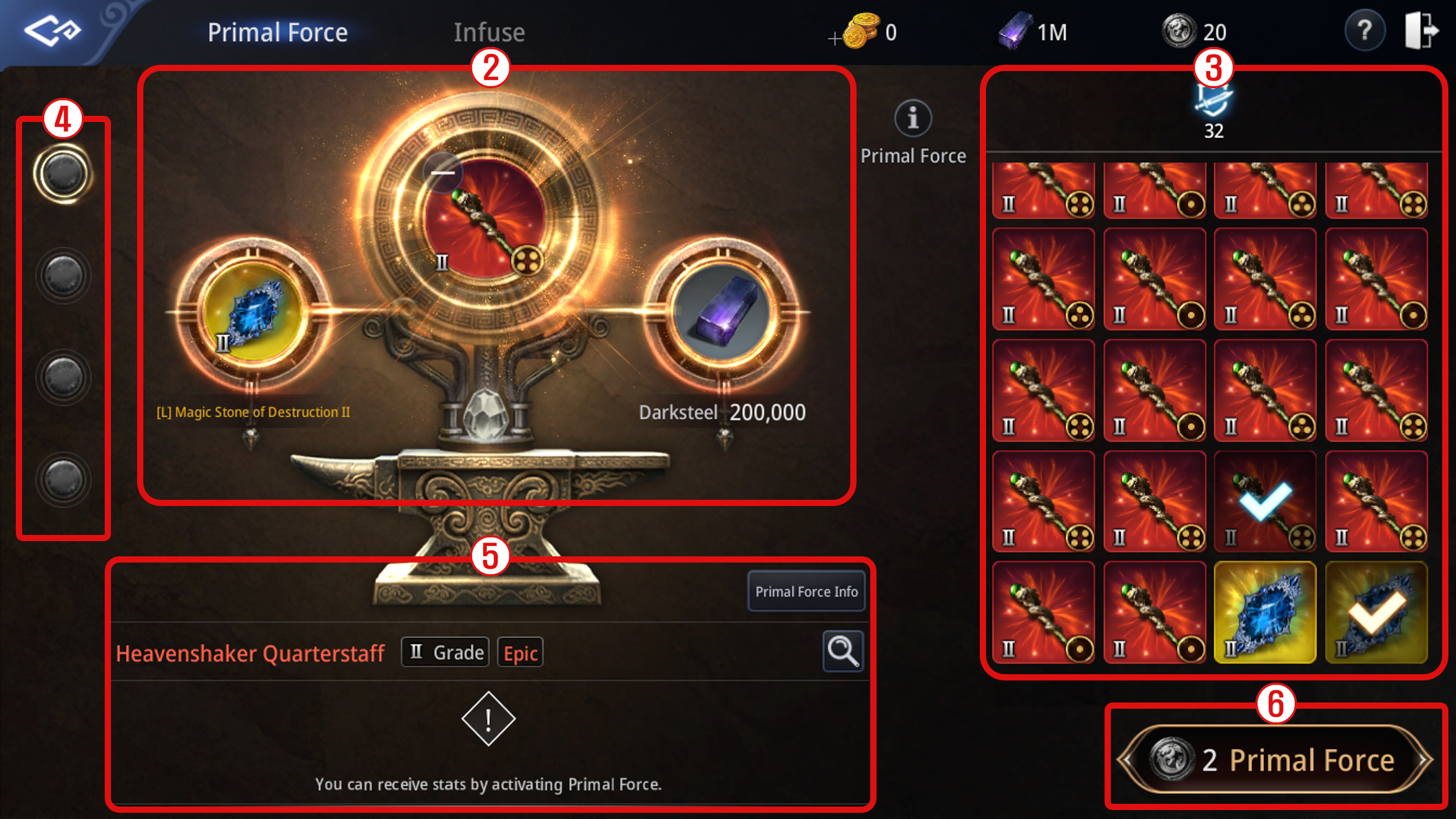
Equipment Slot Required Magic Stone Weapon Magic Stone of Destruction Top Magic Stone of Vigor Bottom Magic Stone of Force Gloves/Belt Magic Stone of Precision Boots Magic Stone of Agility Necklace/Medallion Magic Stone of Antidemon Bracelet/Charm Magic Stone of Focus Ring/Seal Magic Stone of Growth Secondary Weapon Magic Stone of Awakening Earrings Magic Stone of Mana Magic Stone Grade Dragonsteel Required Darksteel Required Epic 1 100,000 Legendary 2 200,000 Mythic 10 1,000,000 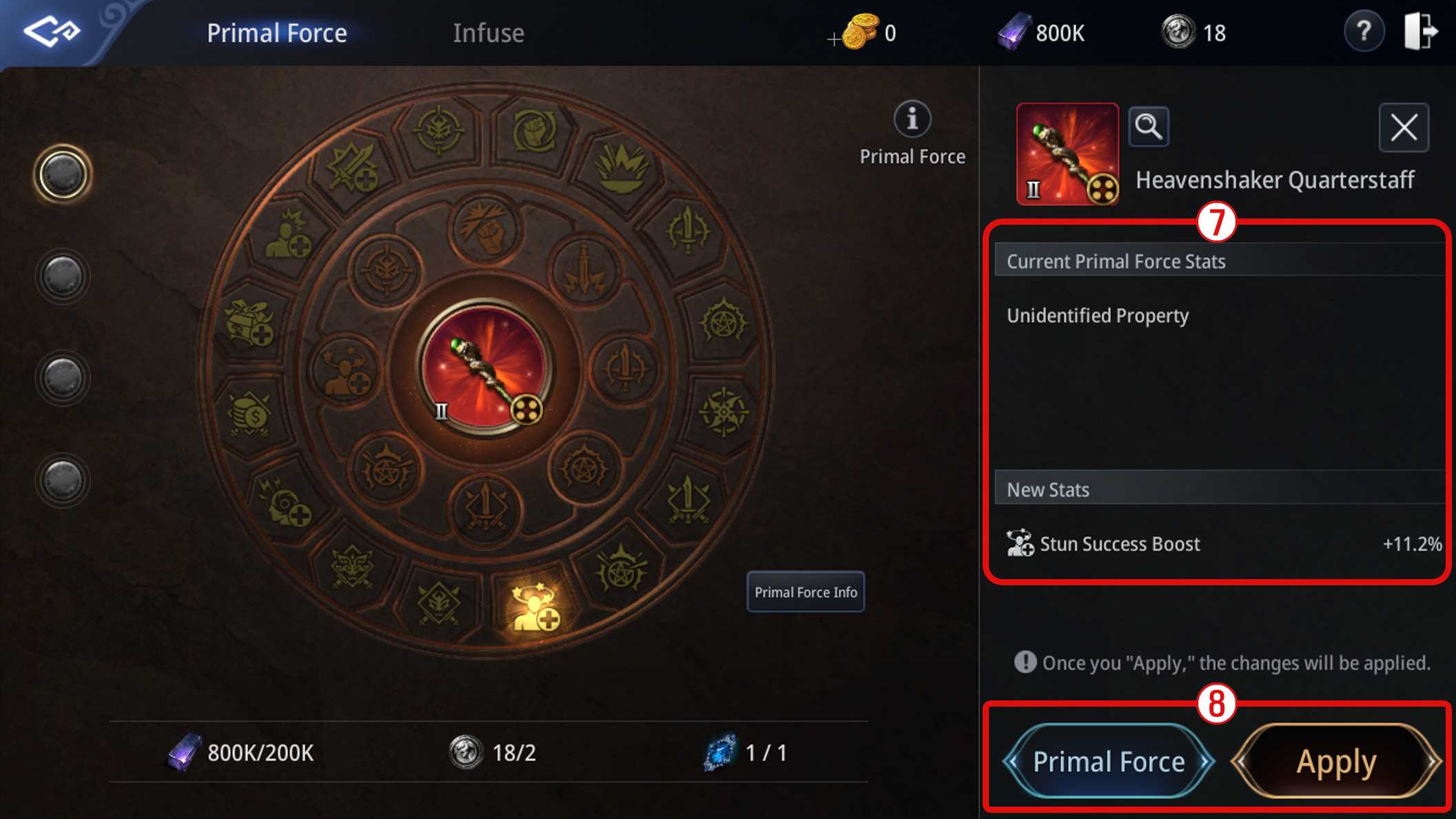
Infusing Equipment Grade Material Equipment Grade Infusion Success Rate Infuse Materials Epic T1–T4 Rare T1 15% 1 Epic Divine Anvil
200,000 CopperRare T2 25% Rare T3 35% Rare T4 45% Legendary T1–T4 Epic T1 15% Epic T2 25% Epic T3 35% Epic T4 45% Mythic Legendary T1 15% Legendary T2 25% Legendary T3 35% Legendary T4 45% Crafting Path Crafting Item Required Materials <Craftsman> NPC in major region cities 1 Mythic Divine Anvil 10 Legendary Divine Anvil 10,000 Glittering Powder 5 Legendary Ice Crystal 2,500,000 Energy 1 Legendary Divine Anvil 10 Epic Divine Anvil 2,000 Glittering Powder 10 Epic Ice Crystal 500,000 Energy 1 Epic Divine Anvil 10 Ingot of Chaos 200 Glittering Powder 20 Rare Ice Crystal 50,000 Energy Exchange NPC Item Purchase Limit Required Trainee's Crescent Jade 1 Mythic Divine Anvil 20 per character per day 50 1 Legendary Divine Anvil 20 per character per day 10 1 Epic Divine Anvil 20 per character per day 2